
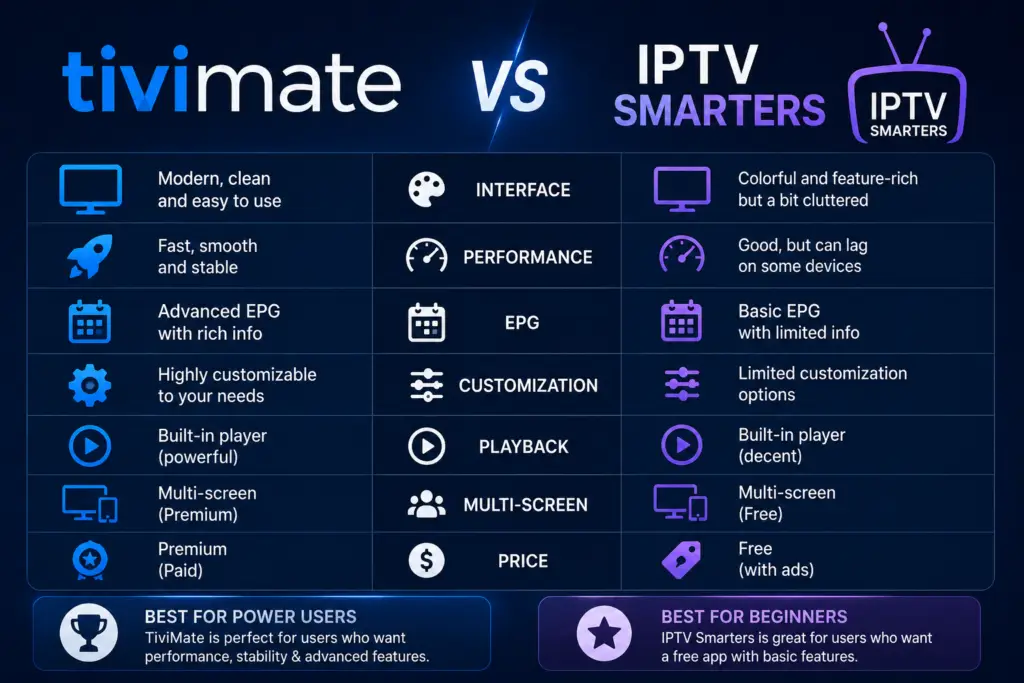
Quick Answer: TiviMate is better than IPTV Smarters Pro for Android TV and Firestick users who want a premium TV-optimized interface, DVR recording, multi-screen viewing, and faster performance. IPTV Smarters wins if you need iOS, Windows, or macOS support, or want unlimited playlists for free. For pure TV experience, choose TiviMate.
In the TiviMate vs IPTV Smarters debate, the best choice depends on your needs. Both TiviMate and IPTV Smarters Pro are excellent IPTV players. This TiviMate vs IPTV Smarters comparison breaks down exactly where each app excels. But they are built for different people and different devices. This comparison breaks down exactly where each app excels, where it falls short, and which one you should choose based on what you actually need.
TiviMate vs IPTV Smarters: Quick Comparison Table
Interface — Which Feels Better on TV?
TiviMate was designed from scratch for TV screens and remote control navigation. Every menu, every transition feels natural on a big screen. The EPG guide is smooth, the channel list scrolls without lag, and the settings menu is well-organized. You never feel like the app was designed for a touchscreen.
IPTV Smarters Pro works fine on TV, but it clearly started as a mobile app that was later adapted for Android TV. The interface is more cluttered, requires more button presses to navigate, and some menus are clearly designed for touch input rather than a remote control.
Winner: TiviMate — if you use IPTV daily on a TV, the interface difference is significant.
Feature Comparison — What Can Each App Do?
DVR / Recording Live TV
TiviMate Premium lets you record live TV channels directly to your device’s storage. You can schedule recordings from the EPG guide, record a single episode or an entire series, and watch recordings from the built-in library. IPTV Smarters has no recording feature at all.
Edge: TiviMate — this is a dealbreaker if you want to record.
Multi-Screen / Picture-in-Picture
TiviMate Premium supports up to 4 channels on screen simultaneously. This is excellent for watching multiple sports games at once or monitoring several channels. IPTV Smarters has no multi-screen support whatsoever.
Edge: TiviMate — unique feature at this price point.
Multiple Playlists
IPTV Smarters allows unlimited playlists for free. TiviMate restricts you to one playlist in the free version — multiple playlists require Premium ($4.99/year). If you subscribe to multiple IPTV providers and do not want to pay, Smarters has the advantage here.
Edge: IPTV Smarters — if you need multiple providers without paying.
Catch-Up TV
Both apps support catch-up (watching shows that aired hours ago) if your IPTV provider offers it. TiviMate requires Premium for catch-up, while IPTV Smarters includes it for free.
Performance — Speed and Stability
TiviMate handles large playlists (10,000+ channels) without noticeable slowdown. The channel switching engine is faster — channels load in 1–2 seconds versus 3–5 seconds on IPTV Smarters. On lower-end devices like the basic Firestick (1 GB RAM), TiviMate uses less memory and crashes less frequently.
IPTV Smarters Pro tends to use more memory and can lag when browsing large EPG datasets. On high-end devices like the Nvidia Shield, the difference is minimal, but on budget devices it is noticeable.
Winner: TiviMate — especially on lower-end hardware.
Price — Is TiviMate Worth Paying For?
IPTV Smarters Pro is completely free with no paid tier, no ads, and no upsells. TiviMate has a free version, but the best features (DVR, multi-screen, unlimited playlists, 7-day EPG) require Premium at $4.99 per year or $14.99 lifetime.
At $4.99 per year, TiviMate Premium is exceptional value — less than a single streaming subscription for a month. But if you genuinely need zero cost and the free features of TiviMate are not enough, IPTV Smarters wins on price.
Winner: IPTV Smarters — free beats paid on price alone.
Platform Support — Where Can You Use Each App?
TiviMate is Android-only. If you need IPTV on iPhone, Windows, or macOS, IPTV Smarters is the only option here.
Winner: IPTV Smarters — significantly broader platform support.
Verdict — Which One Should You Choose?
Choose TiviMate if:
- You use a Firestick or Android TV as your primary device
- You want the best TV-optimized interface
- You need DVR recording or multi-screen viewing
- You value fast channel switching and stability
- You are willing to spend $4.99/year for a premium experience
Choose IPTV Smarters Pro if:
- You need IPTV on iPhone, iPad, Windows, or macOS
- You want multiple playlists without paying anything
- You do not need recording or multi-screen features
- You use a Roku or Smart TV
- You want a dedicated VOD / Movies & Series section
Overall winner for TV users: TiviMate. The interface quality, performance, and exclusive features (DVR, multi-screen) make it the superior choice for anyone watching IPTV on an Android TV or Firestick. IPTV Smarters is a good free alternative, especially if you need cross-platform support, but TiviMate delivers a noticeably better TV experience.
Frequently Asked Questions
For Android TV and Firestick users, yes. TiviMate has a better interface, faster performance, and unique features like DVR recording and multi-screen viewing. IPTV Smarters wins if you need iOS, Windows, macOS, or completely free multi-playlist support.
Yes. Both apps can be installed side by side on Firestick or Android TV. Many users install both — they use TiviMate for daily watching and IPTV Smarters as a backup or for VOD content.
No. IPTV Smarters does not support recording live TV. TiviMate Premium is one of the few IPTV players that includes DVR functionality at this price point.
TiviMate uses less memory and is more stable on low-end Firestick devices (1 GB RAM). IPTV Smarters tends to use more resources, which can cause lag on older hardware.
Yes. IPTV Smarters Pro has a native iOS app available on the App Store. TiviMate does not support iOS at all.
TiviMate has a significantly better EPG experience — smoother scrolling, 7-day guide (Premium), show descriptions, reminders, and a cleaner layout. IPTV Smarters has a basic EPG that works but is not as polished.
TiviMate on Google Play. IPTV on Wikipedia.
Ready to try TiviMate? Install it using Downloader code 272483 on Firestick or from Google Play on Android TV. If you are still undecided, our full alternatives guide covers more options including IMPlayer, OTT Navigator, and Televizo.
In this TiviMate vs IPTV Smarters comparison, we break down the key differences. Both TiviMate and IPTV Smarters have strengths, but the TiviMate vs IPTV Smarters decision depends on your needs.
In this TiviMate vs IPTV Smarters comparison, we break down the key differences. Both TiviMate and IPTV Smarters have strengths, but the TiviMate vs IPTV Smarters decision depends on your needs.
Sources & References
- TiviMate on Google Play — Official Android TV app listing
- tvimate.co Setup Guides — Comprehensive installation and troubleshooting guides
- Best IPTV for TiviMate — Top-rated IPTV providers reviewed for TiviMate users
- TiviMate Not Working? Fixes — 10 proven fixes for channels, audio, and crashing
- Fix TiviMate Error 458 — Too many connections fix and step-by-step troubleshooting
- TiviMate User Agent Guide — Best user agent settings to stop buffering
- TiviMate Xtream Codes Setup — How to add IPTV via Xtream API (faster than M3U)
- TiviMate Keeps Crashing? — Fix app freezes and crashes on Firestick and Android TV
- TiviMate No Sound? — Fix audio not working on Firestick and Android TV
- TiviMate Channels Not Loading — Fix channels that won't play or show black screen
- TiviMate Parental Controls — Lock channels and restrict content with PIN
- TiviMate Backup and Restore — Save settings and playlists
- TiviMate Recording Not Working — Fix recording errors
